 By
By Once limited to specialized industries, virtual reality is now widely accessible, allowing anyone to learn how to use virtual reality headset. Whether for education, entertainment, or professional use, more people are embracing this technology every day. Read on to explore everything you need to get started.
Key Takeaways:
- VR is now widely accessible, and beginners can set up a headset easily with proper space, charging, pairing, and strap adjustments.
- Clear visuals and smooth tracking depend on correct IPD settings, calibration, and choosing the right connection type for your device.
- To stay comfortable, start with short sessions, prevent motion sickness, and maintain the headset with proper cleaning and storage.
9 Easy Steps on How to Connect Virtual Reality Headsets
To get started smoothly, here are the VR headset setup for beginners you can follow.
1. Preparing Your Virtual Reality Headset
Before using your VR headset, unpack everything carefully, since most kits include the headset, two controllers, charging cables, and setup guides. Check for any damage from shipping, then fully charge the headset and controllers.
After charging the headset, choose a safe, open play area at least 6 by 6 feet. Move furniture, décor, and anything you might bump into. Once the space is clear, set up the headset’s boundary system with extra space so you’re warned before getting too close to real-world objects.
Also Read: 10 VR Accessories for Creating the Best VR Experience
2. Getting Your Headset Powered On

Hold the power button on your VR headset for a few seconds to turn it on. It will calibrate automatically, then ask you to choose a language and review safety guidelines.
Next, download the companion mobile app, such as the Meta Quest or PlayStation VR2 app, that can connect your headset to your phone. Once the app is downloaded, pair your headset through the app before your first session to make future setup easier.
3. Adjusting Straps and Achieving Comfort
An essential part of learning how to adjust VR headset for comfort is properly setting the straps. Start by positioning the top strap so it sits firmly without causing pressure points or restricting circulation. Then, gently tighten the side straps until the headset feels secure against your face without pressing too hard on your forehead or cheeks.
If you wear glasses, consider using prescription lens inserts for greater comfort during longer sessions. These inserts can be mounted directly inside the headset, allowing you to play without wearing your glasses.
4. Understanding and Adjusting Interpupillary Distance

When learning how to use virtual reality headset properly, it’s essential to understand interpupillary distance (IPD), which is the space between your pupils measured in millimeters. This matters because the lenses need to align with your eyes to deliver clear and comfortable visuals.
You can measure IPD using a mirror and ruler, asking an optometrist during an eye exam, or using a smartphone app. Most modern VR headsets make the process easier through built-in adjustments such as Meta Quest 3’s preset IPD positions, Valve Index’s adjustment slider, and PlayStation VR2’s eye–tracking–based calibration.
Also Read: 10 Virtual Reality Anime Titles that Define the Genre
5. Connecting Your Virtual Reality Headset
Using a VR headset also involves understanding the connection differences between models. For example, standalone models like the Meta Quest 3 work on their own and use Wi-Fi for apps and multiplayer. Meanwhile, PC VR headsets such as the Valve Index plug into a gaming computer that handles all graphics and performance.
Comparatively, you can connect console headsets like PlayStation VR2 straight to a PS5 with one cable for video, power, and tracking. For that reason, you must make sure that your purchased headset is the one that suits your personal devices’ specifications.
6. Calibrating Sensors and Tracking
When learning how to use a virtual reality headset, it’s important to know how sensor calibration works. Newer VR headsets make this easy. Just stand in your play area, hold a controller, and follow the on-screen steps. The process usually takes less than a minute and only needs to be repeated if you change your play space.
After that, test the tracking by moving your head and arms naturally to ensure the virtual environment stays smooth with no lag or jitter. During the test, make sure the controllers remain accurate even when fully extended or crossed in front of you.
7. Preventing Motion Sickness
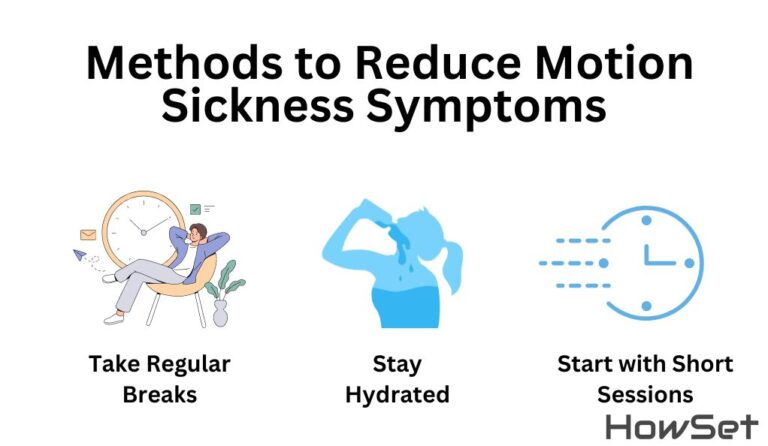
VR motion sickness is something every user should watch out for. It occurs when your eyes and inner ear receive conflicting signals, which can lead to nausea, dizziness, or eye strain.
While the sickness is sometimes unavoidable, you can mitigate it by starting with short five to fifteen-minute sessions and increasing slowly. Choose stationary experiences or games that use teleportation, as these tend to feel more comfortable than smooth analog stick movement.
Then, stay comfortable by sitting when possible, keeping the room cool, and breathing normally. With regular use over two to three weeks, most people develop “VR legs” and experience far less motion sickness, even if they were sensitive in the beginning.
Also Read: 10 Incredible VR Movies for Technology Lovers and Film Fans
8. Maintaining Your Virtual Reality Headset
Taking proper care of your device is also part of learning how to use virtual reality headset. Here are the tips to keep it in good condition:
- Store the headset in a cool, dry place, avoid extreme temperatures and direct sunlight, and keep it away from liquids to prevent short circuits.
- Clean the lenses with a microfiber cloth and proper lens cleaner, and skip anything abrasive.
- Turn off the headset when you’re not using it, and avoid leaving it plugged in constantly.
- Store controllers separately so they don’t turn on by accident and drain the batteries.
With consistent maintenance, most headset batteries stay reliable for two to three years.
9. Choosing Your First Virtual Reality Games

Once everything is set up, you can start exploring your first VR games. For beginners, popular choices include Beat Saber, which combines rhythm gameplay with lightsaber-style action, and Walkabout Mini Golf, a relaxing and beginner-friendly option.
If you prefer something more intense, try Superhot VR, where time moves only when you do, or The Lab, a collection of polished mini-games that showcase what VR can do.
Also Read: 13 Advantages of Virtual Reality Technology in Industries
Experience What VR Has to Offer with the Best Headsets
Mastering how to use a virtual reality headset properly can turn a confusing first try into an amazing experience. Take time to set it up, adjust the fit, and ease into virtual movement. With a little practice, anyone can experience the technology and understand why it has become so popular in the past decade.